SnapDic for Windows — just hover, in every app
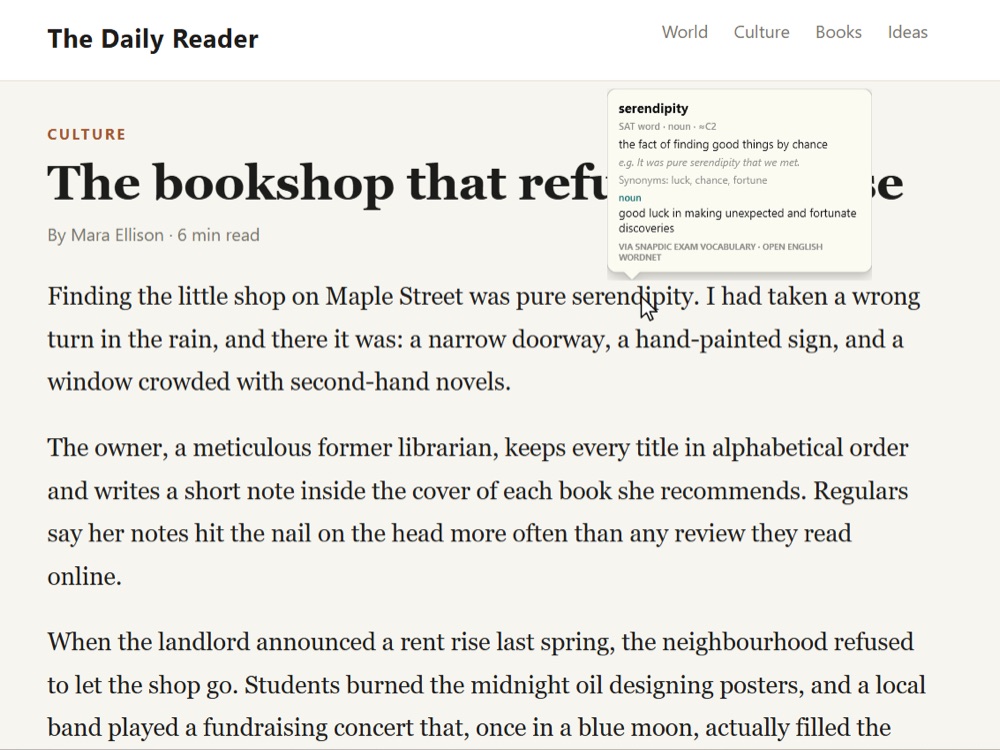
Rest your mouse on any English word — in Edge, Chrome, Word, Outlook, Notepad, PDFs, even text in images — and its meaning appears right above it. No copying, no new windows.
Free on the Microsoft Store · Windows 10 (version 2004 or later) and Windows 11 · x64 and ARM PCs. On a Mac? Get SnapDic for Mac.

Get SnapDic for Windows
Want no ads and saved words? SnapDic Plus is US$19.99 once, for life — and the same key works on Windows, Mac and Chrome.
In the Store, SnapDic is listed as SnapDic - Dictionary by AMIPLAY.
Watch SnapDic at work
Thirty seconds of real lookups: a word, a word form, an idiom and the SnapDic panel.
The video plays from YouTube. Watch on YouTube
Everything the Chrome extension does — everywhere on your PC
SnapDic for Windows uses exactly the same dictionary engine as the SnapDic Chrome extension, so a word means the same thing wherever you meet it.
Hover a word
ubiquitous
SAT · IELTS word · adjective · ≈C1
seeming to be everywhere at the same time
e.g. Smartphones are now ubiquitous.
via SnapDic exam vocabulary
Word forms explained
notarized
past tense of notarize · ≈C2
authenticate as a notary
e.g. We had to have the signature notarized.
via Open English WordNet
Highlight a phrase
break the ice
Idiom / phrase · social
To ease tension at the start of a meeting or social situation so people feel comfortable.
e.g. He told a joke to break the ice.
via SnapDic · see also: warm up, get the ball rolling
Legal English
affidavit
Legal term · ≈C1
A written or printed statement made under oath.
via US Courts Glossary
Your apps, not just your browser
SnapDic reads the word under your mouse with Windows UI Automation, the same technology screen readers use. That means it works in most apps that show text:
- Browsers — Microsoft Edge, Google Chrome, Firefox
- Mail and Office — Outlook, Word and other Microsoft 365 apps
- Everyday apps — Notepad, PDF readers and most modern Windows apps
- Images and scanned PDFs — optional on-device text recognition reads words that apps don't share as text
Built for the way you read
- Hover or Ctrl + hover — show meanings automatically, or only while you hold Ctrl
- Highlight up to four words for idioms and phrasal verbs
- Skip common words — choose how many easy words SnapDic ignores
- SnapDic panel — click the tray icon for a small window listing every word you looked up, with a look-up box
- Open at sign-in — always ready, living quietly in the system tray
Set up in under a minute
No permission prompts and no account. SnapDic never records what you read.
1. Get it from the Store
Click Get it from Microsoft Store, then Get (or Install) on the SnapDic page. Windows downloads and installs it for you.
2. Open SnapDic
Open SnapDic from the Start menu. Its book icon appears in the system tray — if you don't see it, click ^ next to the clock.
3. Just hover
Rest your mouse on any English word. Right-click the tray icon for all the settings; click it to open the SnapDic panel.
Read English on your PC — one hover at a time
Free on the Microsoft Store. No account needed.
Frequently asked questions
Is SnapDic for Windows free?
Yes. SnapDic is free to install from the Microsoft Store and free to use. The free version shows a small sponsored banner in the SnapDic panel. The optional SnapDic Plus upgrade (US$19.99 once, for life) removes the banner and saves every word you look up by day so you can review them later.
Which PCs does it run on?
Windows 11, and Windows 10 version 2004 or later, on regular (x64) and ARM PCs. The Microsoft Store installs the right version for your PC.
Does SnapDic need any special permission?
No. Windows lets apps read the word under the mouse through UI Automation, the same technology screen readers use, so there is nothing to switch on. SnapDic reads only the single word under your pointer, never password boxes, and doesn't store or send what you read. The only thing that ever leaves your PC is a single word sent to an online dictionary when that word isn't in SnapDic's built-in data.
Does it work offline?
Mostly, yes. About 127,000 English words, SnapDic's own learner definitions, 1,020 idioms and phrasal verbs, SAT and IELTS vocabulary, and legal and tech terms are built in. Rare words and names are looked up online (Wiktionary, Wikipedia, Wikidata or the Free Dictionary API) when you're connected.
How do I update SnapDic?
The Microsoft Store updates SnapDic for you, like any other Store app. To check now, open the Microsoft Store, choose Library and click Get updates.
Can I use my SnapDic Plus licence on Windows?
Yes. A SnapDic Plus key works in the Chrome extension, the Mac app and the Windows app. Enter it in the SnapDic panel under SnapDic Plus.
How do I uninstall it?
Right-click SnapDic in the Start menu and choose Uninstall, or go to Settings → Apps → Installed apps, find SnapDic and choose Uninstall.